
Loyalty earning rules
Reward the behaviour you want — spend, visits, reviews, referrals, birthdays, milestones — and control which rule wins when two compete.
Updated 19 July 2026
This is where you turn "come back more often" into something concrete — a points payout attached to the exact thing you want customers to do. Spend more, finish a visit, leave a review, send a friend, show up for the fifth time: each becomes a rule that pays out the moment it happens, with no work from you.
You can run as many rules side by side as you like, and rules for different actions all pay out together on the same visit. The main thing worth getting right is how points are worked out — covered below.
Open in app: Earning rules
You need a live loyalty program first.
Reward customers for spending money
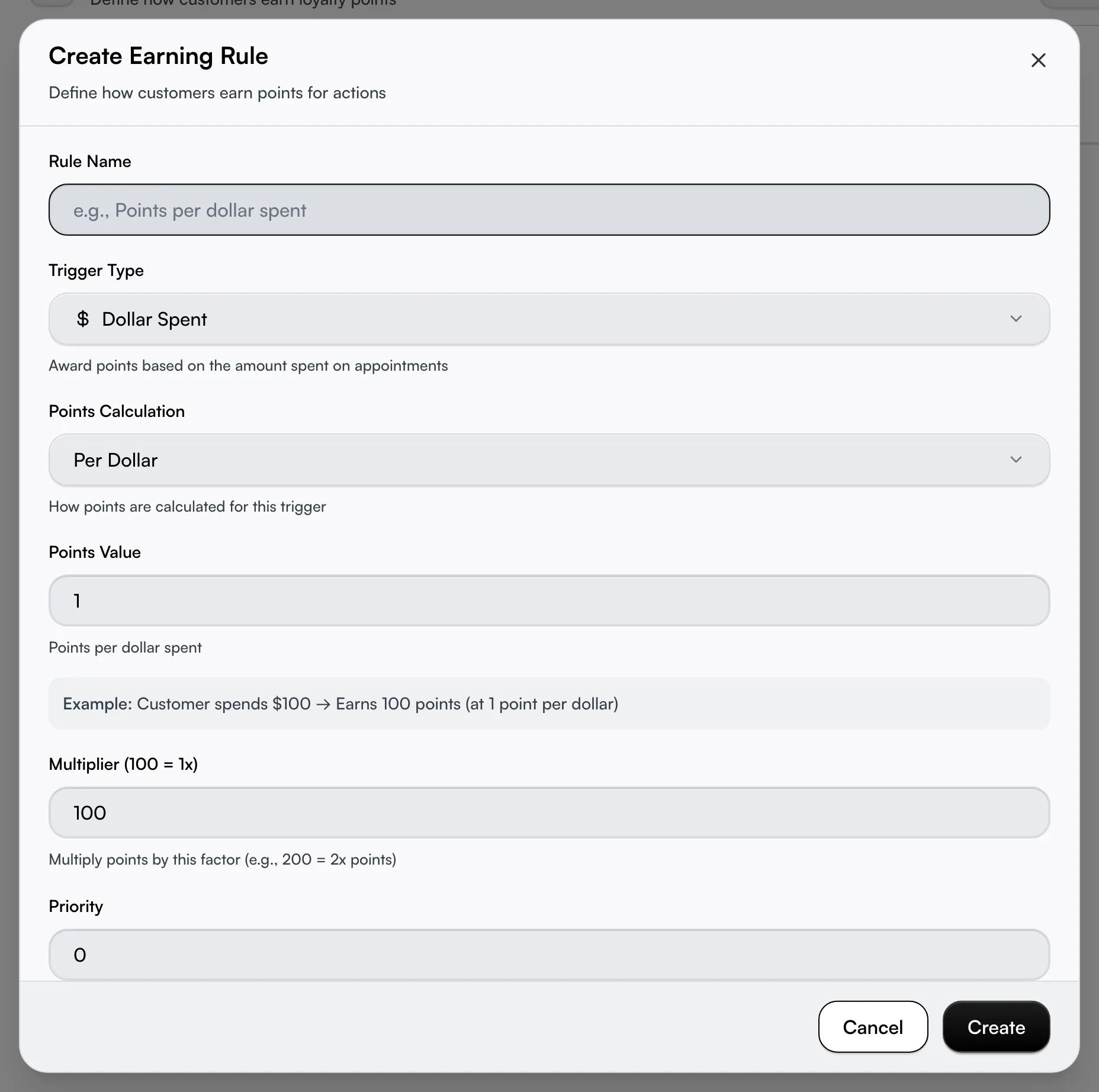
The everyday rule almost every business starts with. Click Create Rule, name it something you'll recognise in the list ("1 point per dollar"), and pick the Dollar Spent trigger. Set Points Calculation to Per Dollar and Points Value to how many points each dollar earns.
A worked Example appears under the fields ("Customer spends $100 → Earns 100 points") so you can sanity-check the maths before saving. Points land after the visit is paid, not when it's booked.
Give every visit points, even the cheap ones
A per-dollar rule pays nothing on a $0 booking. To make sure every completed visit earns something, add a second rule on the Appointment Completed trigger with Fixed Amount points. It pays a flat number the moment a booking is finished and paid, regardless of the total — a freebie or a comped visit still counts.
This is a different trigger from Dollar Spent, so both rules pay out on the same visit. A customer who spends $80 can earn 80 points and a 10-point visit bonus together.
Reward reviews, referrals and milestones
Three triggers reward loyalty beyond the till:
- Review Left (Engagement) pays a flat bonus after a customer submits a review.
- Referral Made (Social) pays the referrer — but only once the friend they referred completes their first visit, not the moment the friend is invited.
- Visit Milestone (Engagement) pays a bonus on every Nth visit, so a "50 points on every 5th visit" rule fires on visit 5, 10, 15 and so on — not just once.
Each uses Fixed Amount points. Set the value, and the Example line confirms what the customer sees.

Surprise customers on their birthday
The Birthday trigger (Profile & Milestones) awards a flat bonus automatically on the customer's birthday — you set it once and never touch it again. It runs on a daily check rather than instantly, so the points appear on the day, drawn from the birthday on the customer's profile. No birthday on file means no bonus, so it pairs well with prompting customers to complete their profile.
Run a double-points promotion
Raise the Multiplier to pay out more without rebuilding the rule. 100 is the normal rate (1x), 200 doubles the points, 150 is one-and-a-half times. The multiplier stacks on top of whatever the rule already calculates, so a 1-point-per-dollar rule at multiplier 200 pays 2 points per dollar for the run.
For a one-weekend "double points" event, switch the multiplier up for the run and switch it back after. A rule card only shows its multiplier when it's set to something other than 1x, so a plain rule stays uncluttered.
Order rules with priority
The Priority number controls the order rules are listed and evaluated — higher numbers sit at the top. The list always shows highest priority first.
Pause a rule without losing it
Open a rule with the pencil icon and switch Enabled off — it keeps every setting but awards nothing until you switch it back on. This is how to park a seasonal bonus for next year instead of deleting and rebuilding it. The trash icon deletes for good, after a confirmation.
Use the filter at the top of the page to show All, Enabled, or Disabled rules when your list grows.
Create a rule for a feature that's still coming
Some triggers carry a Coming Soon badge — Service Booked and Profile Completed today. You can build these rules now: they save, sit dormant, and start paying out automatically the moment the feature ships, with no action from you. A note in the dialog confirms this when you pick one.
Tips
- Points round down. Per-dollar and percentage rules drop any fraction — a 1.5-point result pays 1 point, not 2. Set values so the common totals land cleanly.
- Two triggers, not one, for "every visit earns." Dollar Spent ignores $0 bookings; add an Appointment Completed rule to cover them.
- Changing a rule never touches the past. Points are worked out from the rules live at the moment of payment — editing a rule only affects future visits.
- Referral points wait for the friend's first visit. They don't appear when the referral is sent, which surprises customers who expect an instant reward.
- Staff may only be able to view this page. Creating, editing, and deleting need the loyalty-management permission; without it the buttons are hidden and the rules are read-only.
- If a card shows a "Conditions" line of code-like text, that rule was set up with extra filters (a specific service, a spend range, certain days). Those refine when it pays out and aren't edited from this dialog — leave them unless you know what they do.
Related
- Setting up loyalty — create the program these rules belong to.
- Loyalty rewards — what customers spend their earned points on.
- Loyalty tiers — tier multipliers that boost earning further.