
Loyalty tiers
Give your best customers a level to climb — set the bar, the badge, and the perks, and let Seglo move people up and down on its own.
Updated 19 July 2026
When you want your regulars to feel the difference between a first-timer and a tenth-timer — a visible Bronze, Silver, Gold ladder they climb — you build it here. You set what each level takes to reach and the badge it wears, and Seglo handles moving every customer to the right level on its own.
Open Clients → Loyalty, click More, then Loyalty Tiers. You need an active loyalty program first, and the right to manage loyalty — if you can't see the Create Tier or Recalculate buttons, your role doesn't have loyalty management turned on.
Open in app: Loyalty tiers
Build your first level
Tiers are optional — skip them and everyone earns at one flat rate. To add one, click Create Tier (or Create Your First Tier if you have none).
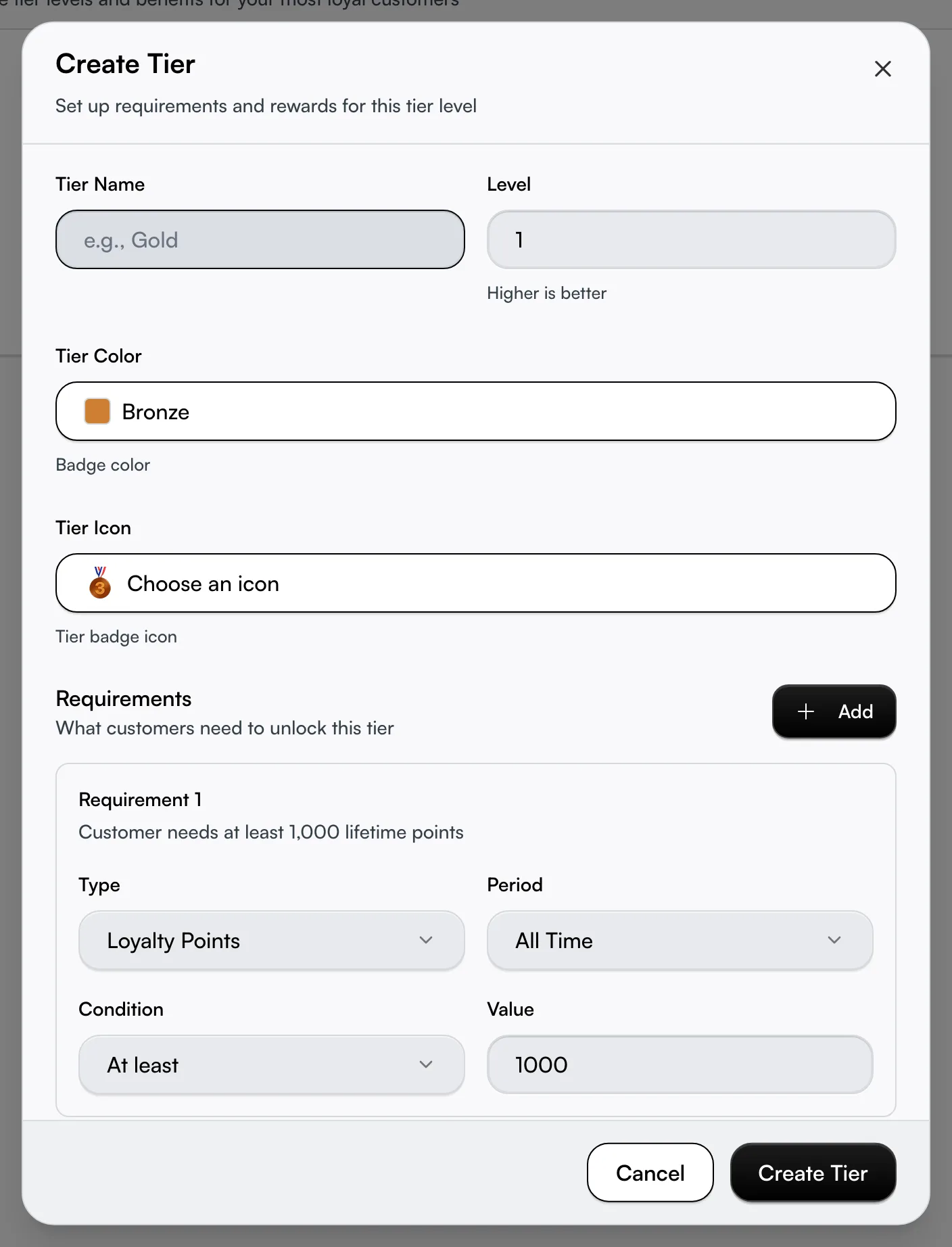
Give it a Tier Name like Gold and a Level number from 1 to 10 — higher is better, so Gold sits above Silver. You don't have to add levels in order; the page always sorts them highest-first on its own. Two tiers can't share the same level number, so each one is a distinct rung.
Set the bar a customer has to clear
Under Requirements, you decide what earns the level. Every requirement is four choices:
- Type — Loyalty Points, Money Spent, or Number of Visits.
- Period — All Time (counts everything they've ever done) or Per Year (counts only the current calendar year, so they re-earn it each year).
- Condition — At least, More than, or Exactly.
- Value — the number to hit. For Money Spent you type real dollars; Seglo handles the rest.
A line under each requirement restates it in plain English — "Customer needs at least 5,000 lifetime points" — so you can sanity-check before saving. Every tier needs at least one requirement; you can't save a level with none.
Stack two conditions with "and" or "or"
Click Add to put a second requirement on the same tier, and a new control appears: All requirements or Any requirement. This is the part most owners never find.
All requirements means a customer must clear every line — "5,000 points and 20 visits" — a strict, hard-to-reach level. Any requirement means clearing just one is enough — "5,000 points or $2,000 spent" — which lets a big spender and a frequent visitor both qualify by different routes. Mix the two across your tiers to reward different kinds of loyalty.
Choose the badge customers see
Pick a Tier Color from twelve presets — Bronze, Silver, Gold, Platinum, Diamond, Sapphire, Emerald, Ruby and more — and a Tier Icon from twelve badges (medals, gem, crown, trophy, star). The colour tints the whole tier card and the badge your customers see, so a clear colour jump from one level to the next makes the ladder read at a glance.
Reward the level with real perks
Under Benefits, set a Points Multiplier (1.0 to 10.0 — 1.5 is a 50% bonus, 2.0 doubles) and a Tier Discount percentage. Leave the multiplier at 1.0 and the discount at 0 for a status-only level that grants a badge but no extra reward. The card shows each perk as its own line — "2× points multiplier", "15% discount on all services" — so the value is visible to you while configuring.

Let Seglo move customers up and down for you
You never assign tiers by hand. Every time a customer's points, spend, or visits change, Seglo re-checks them and bumps them to the highest level they qualify for — and a customer who moves up gets an automatic upgrade email. A tier with customers shows a live count of how many sit at that level, so you can see at a glance how crowded a level is.
A Per Year requirement is the lever for keeping status earned, not given: when the year turns over, that year's count starts fresh, so a customer who doesn't re-qualify drops to a lower level on their next activity. Use it when you want loyalty to mean recent loyalty.
Force an instant refresh after editing
Customers re-check themselves on their own next activity, which can be days away. The moment you change a tier's requirements, click Recalculate Tiers — it re-evaluates every enrolled customer at once and lands them in the correct level immediately, instead of leaving them on yesterday's rules until they next earn. This is the button to reach for right after any requirements edit.
Tips
- You can't delete a level while customers are on it. Seglo blocks it to avoid stranding people — move or recalculate those customers off the tier first, then delete. (An on-screen prompt may suggest customers move down; the safe path is to empty the tier first.)
- Edited a requirement? Recalculate. Without it, customers keep their old level until their next points change — which can look like the edit didn't take.
- Per Year counts the current calendar year only — it doesn't wipe a stored balance, it simply stops counting last year's activity once the year rolls over.
- Spread your thresholds. Pack tiers too close and most customers pile at the bottom. Three tiers is a sensible default; past four, customers lose track of where they stand.
- A status-only tier grants nothing but a badge. If you want a level to actually reward, raise its multiplier above 1.0 or set a discount above 0 — otherwise it's decoration.
Related
- Loyalty program — the program your tiers belong to, and where you enable them.
- Loyalty earning rules — how points are earned in the first place.
- Loyalty rewards — rewards you can lock to a specific tier.
- Loyalty customers — see which tier each customer currently sits in.