
Loyalty rewards
Give customers something worth redeeming points for, control who can claim it and when, and keep a generous offer from quietly costing you.
Updated 19 July 2026
Points are worthless until there is something to spend them on — this is where you decide what that is. You define each reward once, set the price in points and a few limits, and from then on every qualifying customer sees it automatically at checkout. You never hand one out by hand.
Open in app: Manage rewards
You need an active loyalty program first (Setting up loyalty) and a way for customers to earn points (Loyalty earning rules), or a reward has nothing behind it.
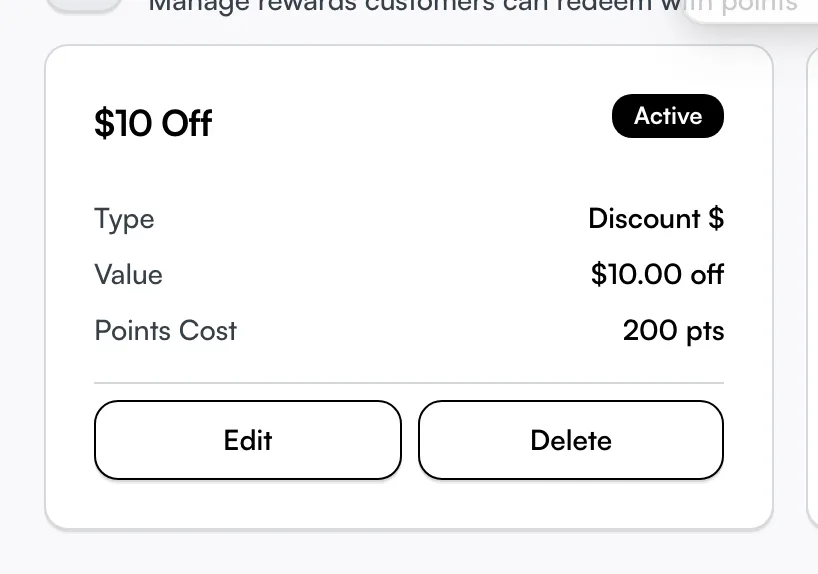
Create a reward customers can claim
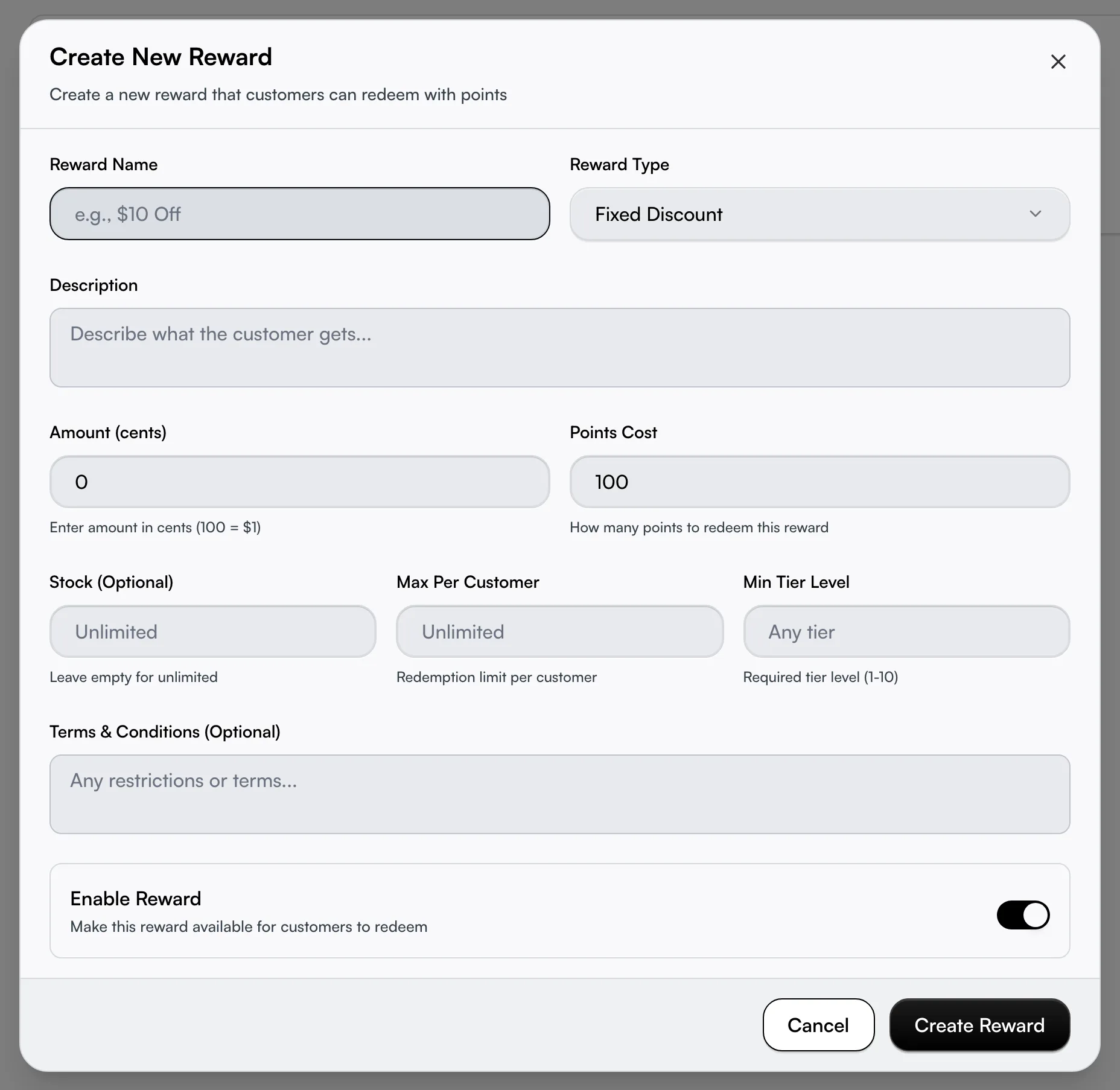
Open your loyalty dashboard, click More, then Manage Rewards, and click Create Reward (the first time, the empty page offers Create Your First Reward — same thing). Then:
- Enter a Reward Name and Description — the customer reads both at checkout, so make the name plain ("$10 Off") and use the description for any catch.
- Pick the Reward Type and set its value in the field that appears.
- Set the Points Cost — how many points it takes to claim. It defaults to 100, so change it.
- Leave Enable Reward on and click Create Reward.
The four types are Fixed Discount (dollars off), Percentage Discount (percent off the total), Free Service (a service fully covered by points), and Voucher/Credit (store credit for a later visit).
Enter the value in the right unit
This is the single most expensive mistake on this page. Percentages go in as a plain number — 10 means 10% off. Every dollar amount goes in as cents — 1500 means $15, not $15.00 and not 1500 dollars. The field label and its hint change with the type ("Amount (cents)", "Enter amount in cents (100 = $1)") to remind you, but a missed decimal is how a $15 voucher becomes a $1,500 one. Check it before you save.
For a Free Service, the value is the service's worth in cents — it covers a service of that value with points.
Cap how often a reward can be claimed
Two separate limits live in the editor, and they do different jobs:
- Stock — the total number of times the reward can ever be redeemed across all customers. Leave it empty for unlimited. Use it for a genuine limited offer ("first 50 only"). Once that many redemptions exist, the reward stops appearing and anyone who reaches checkout late is told it is out of stock.
- Max Per Customer — how many times one customer may claim the same reward. Leave it empty and a customer can redeem it as often as they can afford. Set it to 1 for a one-time welcome perk.
Both are enforced the moment a customer redeems, not just hidden from view, so a reward cannot be over-claimed even if two people redeem at the same instant.
Restrict a reward to your better customers
Set a Min Tier Level (1 to 10) to hide a reward from everyone below that tier — your way to reserve the best perks for your most loyal customers. This only takes effect if you actually run loyalty tiers; with tiers switched off the field is ignored and everyone sees the reward. Leave it blank ("Any tier") to offer it to all.
Add the fine print
The Terms & Conditions field holds any restrictions a customer should agree to — "valid on full-price services only", "one per visit", "not combinable with other offers". Keep it separate from the Description (the short pitch they see first). It is optional, but it is the place to put the catch you would otherwise field on the phone.
Take a reward off the menu without losing its history
To retire a reward but keep its past redemptions on record, do not delete it — open it and turn Enable Reward off. It flips to an Inactive badge, vanishes from checkout immediately, and its history stays intact. Use the filter at the top of the page (All, Enabled, Disabled) to find disabled rewards again later. Delete removes it for good and is for rewards you never launched.
Let eligibility sort itself out
You do nothing per customer. A customer who cannot afford a reward, has hit its per-customer limit, or sits below its tier simply does not see it — and on the customer's own rewards screen they can filter to Can Afford and sort by points cost to find what is in reach. When they redeem, they get a short confirmation code and an email; you do not generate or send anything.
Tips
- Dollars are cents. 1500 is $15, not 15. A reward that gives away far more than you meant is almost always a missed decimal in the value field.
- A new reward is live the moment you save it (Enable Reward is on by default). If you are building one ahead of a launch, turn Enable off until you are ready.
- Stock and Max Per Customer are different limits. Stock is the grand total for everyone; Max Per Customer is per person. Setting one does not set the other.
- Min Tier Level does nothing without tiers. If you have not switched tiers on, the restriction is ignored and everyone sees the reward.
- Check the maths against your earning rate. A generous voucher behind a fast points rate can become a discount on nearly every visit.
- A Free Service reward aimed at a service you later delete loses its target. Revisit your rewards whenever you reshape your menu.
Related
- Loyalty program — the program these rewards belong to.
- Loyalty earning rules — how customers earn the points they spend here.
- Loyalty tiers — restrict a reward to your higher tiers.