Booking deposits
Take a percentage by card when customers book, then collect the remaining balance by cash or card after the groom.
Updated 4 October 2026
Collect part of the grooming bill when a customer books, then take the rest after the visit. For a $100 booking with a 20% deposit, the customer pays $20 by card online and can pay the remaining $80 in cash at your shop.
Open in app: Booking settings
Get ready to collect a deposit (web app)
Your business must charge in AUD, have a plan that includes online payments, and use a fully connected Stripe account as its active payment provider. A terminal connection or the ability to save cards alone is not enough.
Check Payments settings to finish Stripe setup. If payment fee terms appear in booking settings, an authorised administrator must accept them before you can enable deposits.
Set the percentage customers pay (web app)
- Open Booking settings → Cancellations & cards.
- Turn on Require a deposit to book.
- Enter a whole number from 1 to 100 in Deposit percentage. Enter 20 to collect 20% when the customer books.
- Choose Save deposit settings.
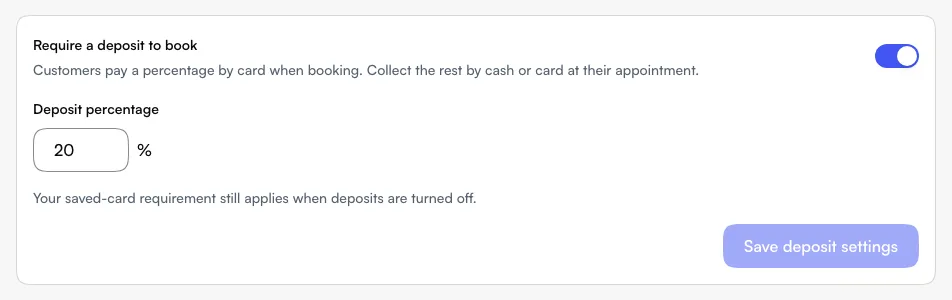
This is a business booking setting. You do not enter a separate deposit amount for each service. Setting 100% requests the full payable amount upfront, subject to the small-payment exception below. Your team still records and completes the grooming visit as usual.
Check what the customer pays online (web booking page)
The customer sees the deposit percentage when reviewing the booking. After they accept the booking terms and choose Continue to payment, the payment page shows:
- Booking total — the total for the booking.
- Deposit due now — the card payment to make now.
- Remaining at appointment — the balance to pay at the shop.
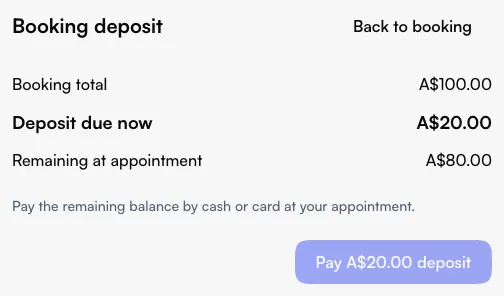
The customer enters their card details and selects Pay $20.00 deposit for this example. The amount on the button follows their bill. Discounts and gift-card credit can change the amount due, so use the displayed figures rather than calculating from the service's list price.
If less than A$0.50 is left to collect by card, no card payment is taken online; that amount stays payable at the appointment. When Deposit due now is zero, the customer skips the card payment step.
Successful payment completes the payment step. If your shop approves booking requests manually, the booking still follows that approval process. Paying a deposit does not automatically save a card for you to charge later.
Collect the rest in cash (web app)
- Open the booking from Schedule after the grooming visit.
- Complete the visit, then choose Take payment when there is a balance to collect.
- Check the outstanding amount. With an unchanged $100 bill and a $20 deposit, it is $80.
- Collect the $80 from the customer and select Cash to record it.
Cash records money you have received; selecting it does not take money from the card. You can also collect the balance using another available checkout method. See Payments overview for checkout steps.
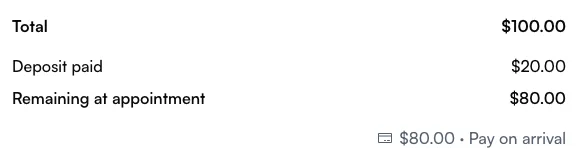
Customers can check Deposit paid and Remaining at appointment in My Bookings. Pay on arrival refers to the remaining balance, even when they have already paid a deposit.
Change or stop the deposit requirement (web app)
Return to Booking settings → Cancellations & cards, change the percentage or turn off Require a deposit to book, then choose Save deposit settings. This does not refund deposits already collected.
Require a card to book is a separate saved-card setting. It still applies when deposits are off. If you want customers to book without either paying a deposit or saving a card, check both settings; only the business owner can change the saved-card requirement.
Handle a cancellation or interrupted payment (web app)
A paid deposit uses the cancellation terms accepted with that booking. Changing your policy later does not replace those terms. An applicable cancellation or no-show fee takes the deposit into account; it is not collected twice. If you decline a booking request, the unearned deposit is returned. See Booking policies.
If the customer's payment screen is interrupted, they can reopen it and use Check payment status when offered. If it says the payment needs checking, ask them to contact your shop before trying another payment.
Related
Related