Move your number or end Seglo Phone
Take your Seglo Phone number to another provider, undo a cancellation before it takes effect, and know what happens to the number after Seglo Phone ends.
Updated 2 October 2026
Your customers know your number, so leaving Seglo Phone shouldn't mean losing it. You can take the number to another provider while Seglo Phone runs, and for 30 days after it ends. Everything here is on the web, under the owner's Subscription page. The Seglo Phone app and the Seglo appointment app don't have billing or cancellation screens.
Open in app: Seglo Phone plan (Settings → Subscription → Seglo Phone)
Move your number to another provider (web app)
You don't need to contact Seglo. The new provider starts the move.
- Open Settings → Subscription → Seglo Phone.
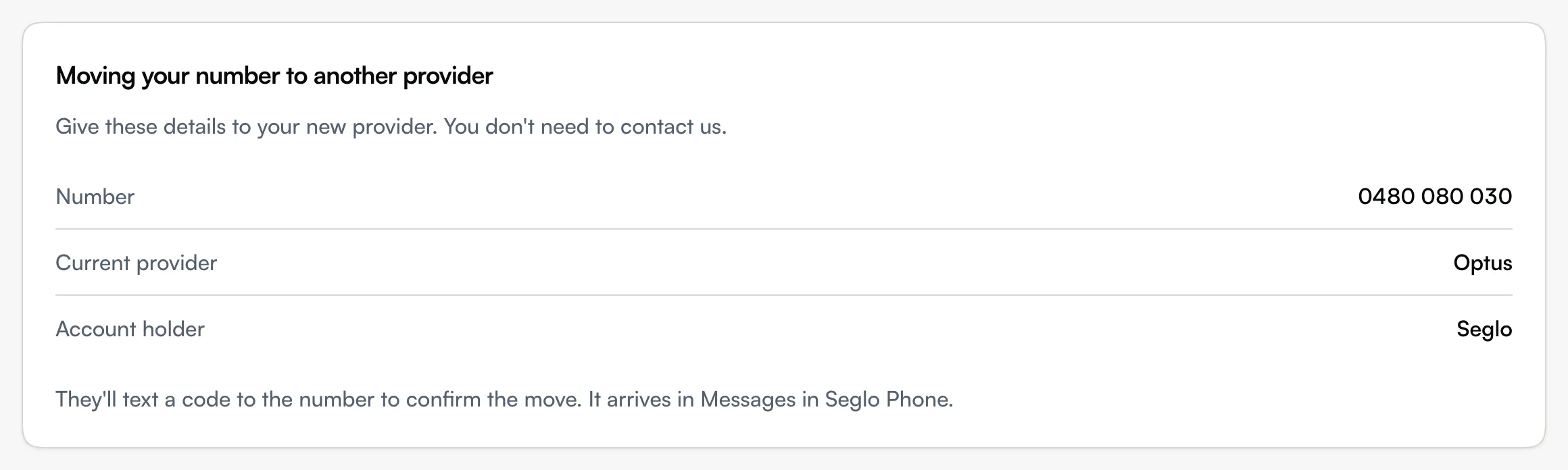
- Find Moving your number to another provider. It lists the Number (or Numbers), the Current provider, the Account number and the Account holder.
- Give those details to your new provider.
- The new provider texts a code to your number to confirm the move. While Seglo Phone is running, the text arrives in Messages in the Seglo Phone app.
When the move completes, you get an email: … has moved to another provider. If it was your last Seglo Phone number, Seglo Phone ends on that date. If you have other numbers, they carry on, and from your next bill you're no longer charged for the one that moved. What you've paid for the current period isn't refunded.
If you didn't ask for the move, the email says to contact support@seglo.ai straight away.
Cancel Seglo Phone (web app)
On the same page, choose Unsubscribe, then Cancel it. Your number keeps working until the end of the billing period, and the status reads Ends with the date. Seglo emails you: Seglo Phone cancelled: your number works until …. The full steps and pricing are in Subscription plan.
Undo a cancellation (web app)
Until your number stops, the page offers Keep Seglo Phone. Choose it and nothing changes: the number keeps working and your next bill comes as normal. Seglo emails Seglo Phone carries on.
If it can't be undone, the page says why next to the button:
- Seglo Phone has already stopped, so this can't be undone.
- Seglo Phone isn't ending, so there's nothing to undo.
- This cancellation can't be undone here. Email support@seglo.ai and Seglo keeps Seglo Phone running.
What happens after Seglo Phone ends
When the period ends, your numbers stop ringing and Seglo emails Seglo Phone has ended. The page then reads Ended, and the details your new provider needs stay on it.
- You have 30 days to move the number to another provider. The page and the email give the exact date.
- The number no longer has an inbox. Any text sent to it is emailed to the business owner instead, with the subject New text to your former number …. That's how the new provider's code reaches you.
- After the 30 days, Seglo releases the number and it can't be moved.
Ending Seglo Phone can't be undone once the number has stopped. To use Seglo Phone again later, you set up a number from the start.
Tips
- Move before the date in the email. Once Seglo releases the number, it's gone for good.
- Watch your email after it ends. The new provider's code arrives there, not in the app.
- Bookings isn't affected. Cancelling Seglo Phone doesn't cancel your Bookings plan, and the other way round.
Related
- Subscription plan: cancel, resubscribe and see Seglo Phone invoices.
- Set up Seglo Phone: bring a number to Seglo or get a new one.
- Phone numbers and routing: emails Seglo sends while a number is set up.
Related