Subscription plan and upgrades
Manage Bookings, Seglo Phone and AI Receptionist separately: change your Bookings plan, unsubscribe or resubscribe, and see each product's invoices.
Updated 13 October 2026
You come here when something about what you pay has to change: a second shop, a feature your plan doesn't have, or a product you no longer use. Seglo bills Bookings, Seglo Phone and AI Receptionist separately, and each one has its own page.
Open in app: Subscription
Subscription is in the web app only: Settings → Subscription. The Seglo appointment app and the Seglo Phone app don't have billing screens. Changing a plan or card needs permission to manage the Seglo subscription, which the business owner has.
See what you're subscribed to
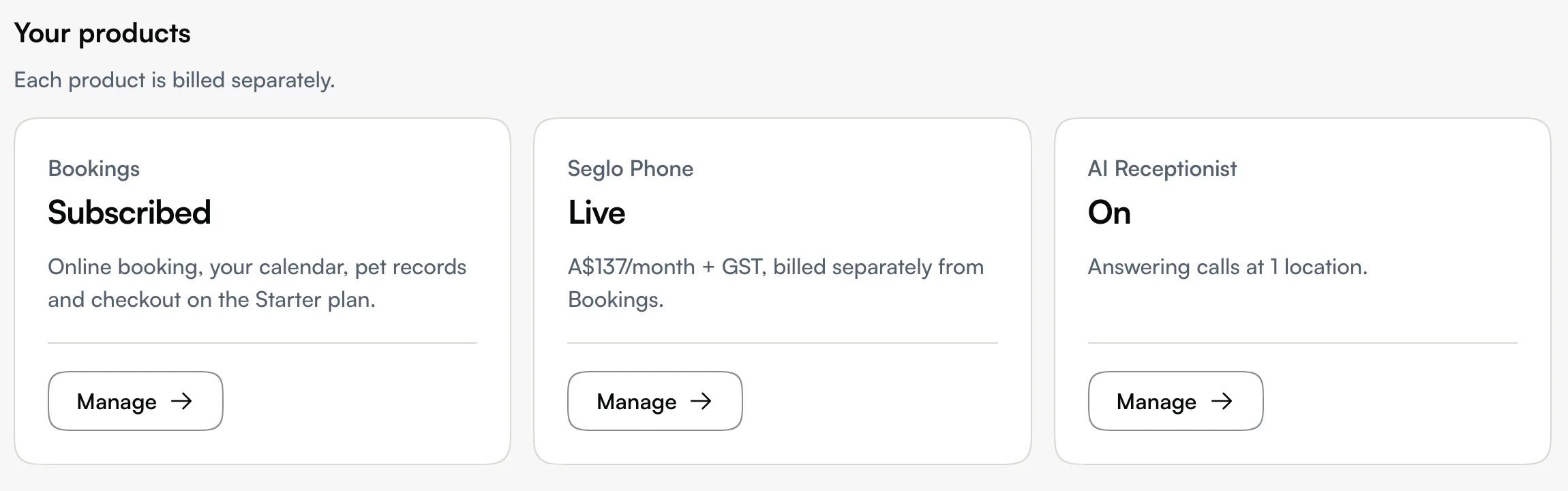
Settings → Subscription shows Your products: one card each for Bookings, Seglo Phone and AI Receptionist. Each card shows whether it's on (for example Subscribed, Live, Ends with a date, or Not subscribed). Click Manage to open that product's page. All changes happen there.
Each product page ends with that product's own invoices: date, amount and a View link. For every invoice in one list, with PDF downloads, use Billing.
Choose or change your Bookings plan
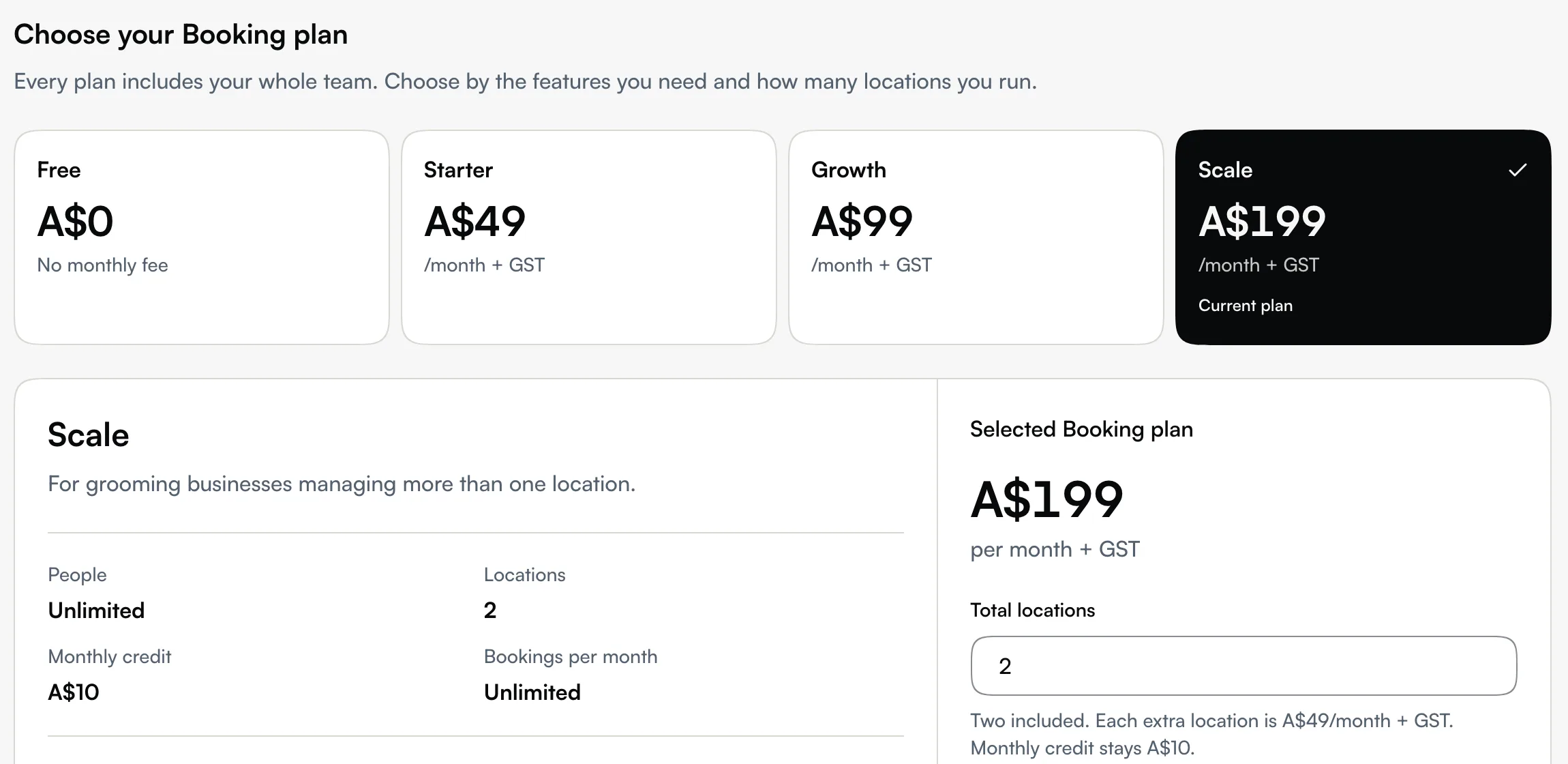
Open Subscription → Bookings. The top shows your Current plan, its price per month + GST, the Monthly credit it includes, your Locations and your Next billing date. On the current plans it also shows Bookings per month. A Trial or Past due badge sits beside the plan name when it applies.
Below that, under Choose your Booking plan, pick a tier to see what it includes. Every plan includes your whole team, so the number of people never decides your tier. What does:
| Plan | Price (per month + GST) | Locations | Monthly credit | Bookings per month |
|---|---|---|---|---|
| Free | A$0 | 1 | none | 50 |
| Starter | A$49 | 1 | none | Unlimited |
| Growth | A$99 | 1 | A$5 | Unlimited |
| Scale | A$199 | 2, then A$49 a month for each extra | A$10, shared by all locations | Unlimited |
| Custom | Agreed with Seglo | Agreed | Agreed | Unlimited |
On Free, each pet appointment counts once, in the month of its service date in your shop's timezone. Cancelled bookings don't count, and a rescheduled booking moves to its new month. When a month already has 50, Seglo won't take another booking for that month until you upgrade. Customers booking online are asked to pick another month or contact you.
Seglo also charges 0.5%, including GST, on each successful eligible online payment. Stripe's own processing fees are separate. See Payment methods.
Had your account before these plans? You keep your existing terms, including your locations, monthly credit and unlimited bookings, and you keep them when you change tier. The page says Your existing plan terms are preserved., and the plan picker shows your own terms for each tier.
What each tier adds:
- Free covers the everyday work: online booking, the calendar, pet records, rostering, pay calculation, the waitlist, email reminders and Stripe online payments.
- Starter adds Grooming Care, reports, Tap to Pay, gift cards, service bundles and charging saved cards for cancellations and no-shows.
- Growth adds waitlist matching, automatic gap filling, Xero sync, intake forms, control over who sees private customer details, timesheets, leave management and the staff handbook.
- Scale adds more than one location, staff performance and the business performance overview.
Pages your plan doesn't include are hidden from the sidebar and Settings. To see what you're missing and which plan has it, open More features.
To change plan, click Upgrade to [plan] or Downgrade to [plan], read the price in Confirm your plan change, then click Confirm change:
- An upgrade starts once the payment is confirmed. You pay for the rest of this billing period then. If the page says payment is needed, use Complete payment; your current plan stays until it's paid.
- A downgrade waits until the end of this billing period. You keep your current plan until then, and anything the new plan doesn't include stops on that date. Until it happens, the page shows when your plan changes.
From a trial, from Free or with no plan, the button reads Start with [plan] and opens a secure checkout. To move from a paid plan to Free, use Contact support on the page. For a larger grooming group, Talk to sales under Need a custom plan?
Add or remove locations on Scale
On Scale, set Total locations under the selected plan. Two are included and each extra location adds A$49 a month + GST. Extra locations don't add monthly credit. If you kept an earlier Scale plan with unlimited locations, there's nothing to set. Click Update locations (or Upgrade to Scale from another plan), then Confirm change.
- More locations start once the payment is confirmed, with a charge for the rest of this billing period.
- Fewer locations take effect at the end of this billing period. The page shows Your location allowance will change to the new number until then.
- You can't go below the locations you have active. Archive the shops you no longer run first.
When every location your plan covers is in use, Business profile shows Your plan covers that number in place of Add location, with a link to Manage plan and locations.
Unsubscribe from Bookings, or come back
On Subscription → Bookings, click Unsubscribe and confirm. You can still use Bookings until the end of the billing period you've paid for, and you won't be charged again. After that date, your calendar, online booking and booking settings are hidden. Your clients, pets and booking history are kept.
- Changed your mind before the date? Click Keep Bookings.
- After it ends, click Subscribe to Bookings to come back.
If you also have Seglo Phone, you can only unsubscribe from Bookings once your phone number is live and paid up.
Manage or cancel Seglo Phone
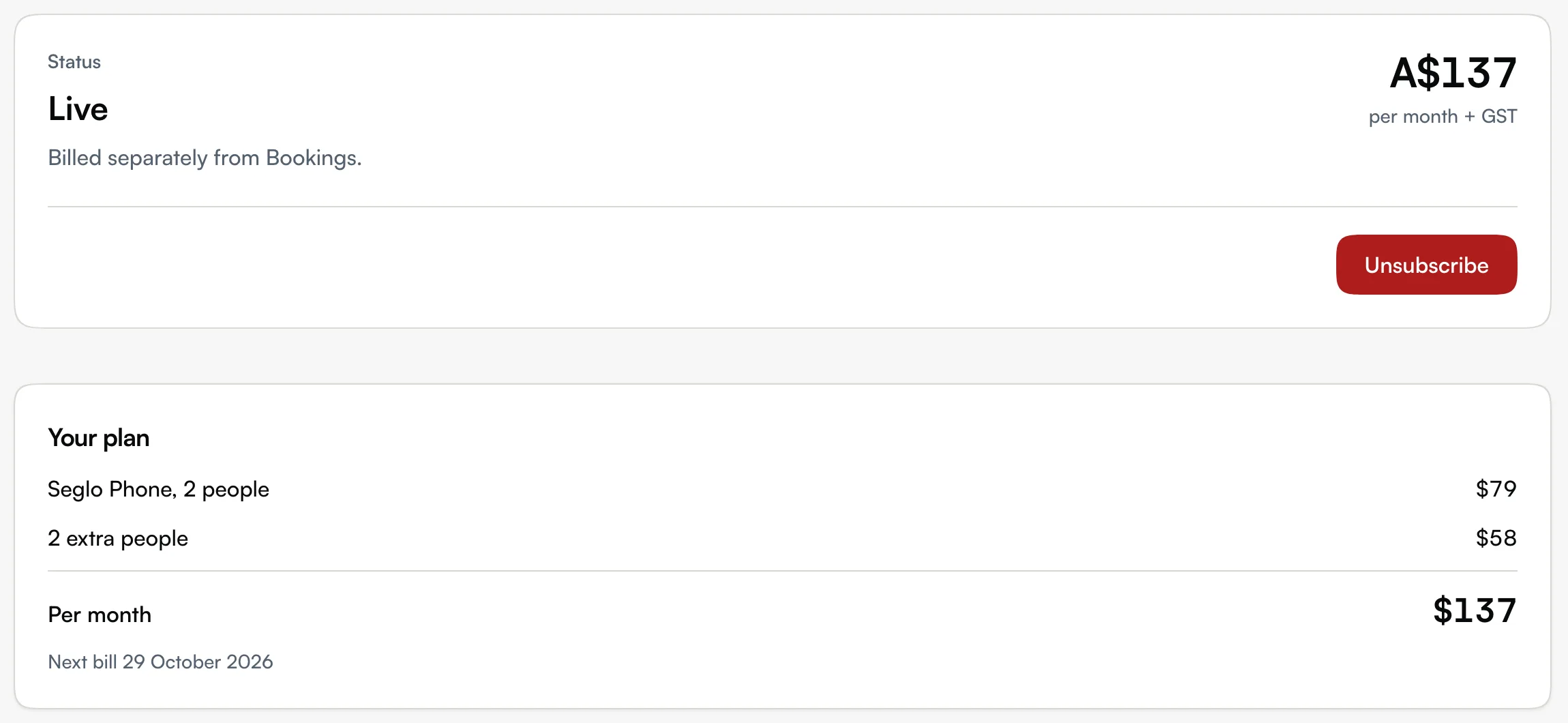
Open Subscription → Seglo Phone. Seglo Phone is A$149 once for setup, then A$79 a month + GST per number, including 2 people. Each extra person is A$29 a month, up to 5 people. You pay per person, not per phone: each person can use as many phones and tablets as they like at no extra charge. The monthly fee doesn't start until your number is live. Until then, the page shows Continue setup to finish it. See Set up Seglo Phone.
While it's live, the page shows Your plan with the people you pay for, the monthly total and your next bill. If a Seglo Phone payment fails, update your card. A failed Seglo Phone payment doesn't affect your Bookings plan.
To stop it, click Unsubscribe, then Cancel it:
- Your number keeps working until the end of the billing period. Until then you can click Keep Seglo Phone to undo it.
- Once it stops, you have 30 days to move the number to another provider. The page lists the details your new provider needs. After those 30 days, Seglo releases the number.
Cancelling Bookings never cancels Seglo Phone, and Seglo Phone can be cancelled whether or not you have Bookings.
Add AI Receptionist
Open Subscription → AI Receptionist. It's A$149 per location per month + GST, and calls it answers use credit at A$0.40 a minute. You turn it on for each location, so the page shows which locations have it. Receptionist settings takes you to set it up.
Callbacks come with AI Receptionist. When a call needs a person, the AI files a callback with the reason. Without AI Receptionist, the Callbacks page offers Add AI Receptionist instead.
Tips
- A downgrade quietly switches features off on the change date. If you rely on Xero sync or intake forms, check which tier includes them before you move down.
- On Free, the 50 is per month, not per year. A cancelled booking frees its place, and one moved to another month counts there instead.
- Past due means a charge failed. Update the card in Billing.
- Usage costs the same on every tier. Automated texts and AI call minutes come out of your credit, not your monthly fee. See Credits and Usage.
Related
- Billing: your card, billing details and every invoice.
- Credits: the balance usage is paid from.
- Usage: calls, texts and dictation by month.
- Set up Seglo Phone: get your business number live.
Related