Call protection
When your connection drops mid-call, your customer stays on the line while you reconnect or a teammate takes over. You can also join a teammate's call.
Updated 16 October 2026
The salon Wi-Fi cuts out while you're booking a groom over the phone. Your customer isn't left in silence: they stay on the line while your app reconnects, or a teammate takes the call over. Teammates can also join a call that's going well but needs a second person.
Open in app: in the Seglo Phone app, use Join in the band at the top of the screen. On the web app, use Join under Live calls in Calls.
This works in the Seglo Phone app on iPhone and Android, and for calls you make or answer on the web app. Joining and taking over need the latest version of the Seglo Phone app. The Seglo appointment app doesn't take calls.
When your connection drops
You don't need to do anything. It works the same on calls you answer and calls you make.
- Your customer hears "One moment please, we are just reconnecting you.", then ringing. They stay on the line.
- Your call screen shows Reconnecting with the seconds left.
- When your internet comes back, your app picks the call back up and you carry on talking.
Your customer is held for about 35 seconds. In that time, anyone else who answers that number can take the call over.
Take over a teammate's dropped call (Seglo Phone app)
When a teammate's call drops, a band at the top of your app names the call, on whatever screen you're on.

- Tap Join. There's no confirmation, because your customer is waiting on their own.
- You're straight through to the customer, and the call is yours.
Take over a teammate's dropped call (web app)
-
Open Calls. Live calls sits above your call history. It shows only while Browser calls are on for this computer.
-
A dropped call is marked Dropped, with who it dropped from and the seconds left.

-
Click Join. The call card at the bottom right connects you to the customer.
If your teammate's connection comes back after you've taken over, the call stays with you.
If nobody picks the call up
When the time runs out, your customer hears what happened, the call ends, and a callback request is created in Callbacks. No text message is sent.
- A call your customer made: "Sorry, we've lost the connection. Our team will call you back." The callback names who they were talking to.
- A call you made: "Sorry, we've lost the connection. We'll call you back shortly." The callback goes to the person who placed the call.
Until someone handles it, Live calls on the web shows the call as Call back, with who it dropped from. If your customer hangs up while they're waiting, the call simply ends and no callback is created.
Join a teammate's live call (Seglo Phone app)
Join a call when a new groomer needs help with a question, or a customer wants to talk to the owner.
-
The band at the top shows who is on a call. Tap Join.

-
Join this call? names who is talking with whom. Tap Join to go in, or Cancel.
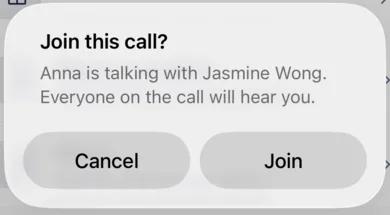
Everyone on the call hears a short tone as you come in. Then everyone can hear and talk to everyone, your customer included.
Join a teammate's live call (web app)
-
In Live calls on Calls, find the call marked On call and click Join.
-
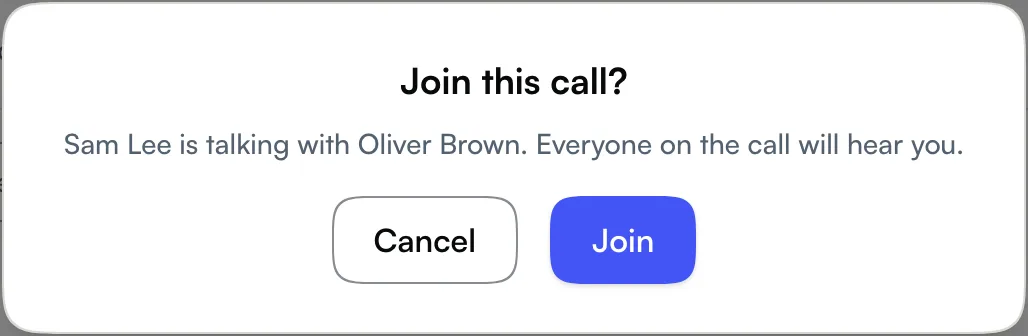
Join this call? names who is talking with whom. Click Join, or Cancel.
See who else is on the call
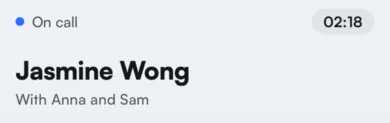
The call screen lists everyone else on the call under the customer's name, such as With Anna and Sam. The web call card shows the same line.
People can come and go. A teammate who joined can hang up and the call carries on. If the person who answered hangs up first, the call carries on with whoever joined. The call ends when your customer hangs up.
Who can join
You can join or take over a call on a number you answer, at that number's location. You won't see Join for numbers or locations you can't use. You also can't join:
- A call that's still ringing. Answer it instead.
- While you're on another call. Finish your call first.
- An emergency (000) call. These are never held or joined.
If Join doesn't work
You'll see Couldn't join in the app, or a message on the web, with the reason:
- "Anna has taken this call." or "Someone else has taken this call.": two people tapped Join on a dropped call at the same moment, and the other person got it first.
- "That call has ended.": the customer hung up just before you joined.
- "You can't join this call right now. It may have just ended.": the call is being transferred, has gone to voicemail or has just finished.
- "You can't join calls on this line.": you don't answer that number at that location.
- "Finish your current call first.": you're on another call.
Check who joined or took over
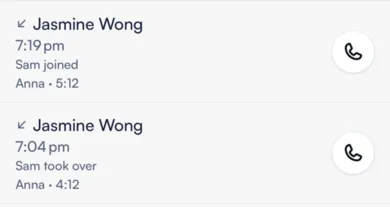
Call history keeps one entry per call.
- Seglo Phone app: in Keypad → Recents, the row reads Sam joined or Sam took over. Open the call for the full line, such as Answered by Anna Chen · Sam Lee took over.
- Web app: in Calls, the call's row and its Call Details read, for example, Sam Lee joined or Sam Lee took over.
Tips
- You can't transfer while someone has joined. Transfer comes back once they leave. See Call transfer.
- Recording includes everyone. If call recording is on, the recording has everyone on the call. See Call recording.
- Hanging up with no internet doesn't end the call. Seglo can't hear that you hung up, so your customer is held and then gets the connection-lost message and a callback.
- A force-closed app doesn't rejoin. If you swipe the app away mid-call, a teammate can take over while your customer waits.
- It covers drops on your side. Wi-Fi, mobile data, the app or the browser. If Seglo's own phone service fails, calls in progress may drop.
Related
Related